The Ultimate UK IPTV Guide (2026): Everything You Need to Know About Connections, Streaming, and Multi-Room Setup
The Ultimate UK IPTV Guide (2026): Everything You Need to Know About Connections, Streaming, and Multi-Room Setup
The way British households consume television has undergone a monumental shift. Traditional satellite dishes and restrictive cable contracts—long criticized for steep prices, annual rate hikes, and fragmented sports packages—are rapidly being replaced by Internet Protocol Television (IPTV).
By delivering live channels, on-demand entertainment, and high-definition sports directly over your broadband connection, IPTV gives cord-cutters ultimate control over what, where, and how they watch.
However, navigating the IPTV landscape in 2026 can feel overwhelming. Questions around subscription sharing, simultaneous connection limits, device compatibility, and server stability trip up even tech-savvy users.
This comprehensive guide breaks down everything you need to know to build the ultimate, hassle-free home streaming setup.
1. What Is IPTV and How Does It Work?
Unlike traditional broadcasting that broadcasts every channel simultaneously via satellite or terrestrial signals (Freeview), IPTV streams the specific channel or video file you request directly through your internet router.
When you subscribe to an IPTV provider, you receive access credentials—typically an M3U playlist URL or Xtream Codes login (Username, Password, and Server URL). You then input these details into an IPTV player app on your streaming device to immediately unlock live streams, electronic program guides (EPG), and Video-on-Demand (VOD) catalogs.
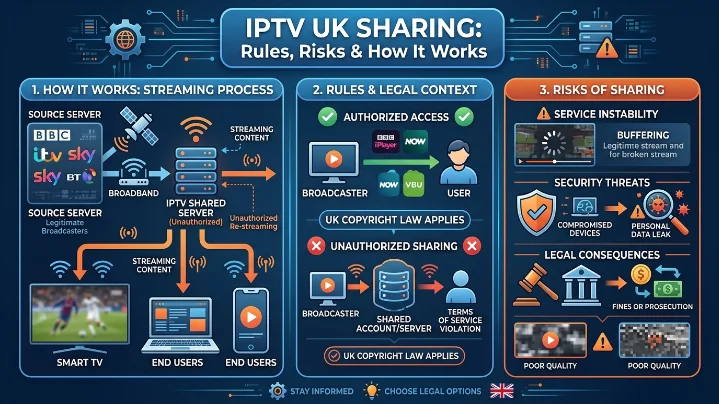
2. IPTV Subscription Sharing: Rules, Connection Limits & Risks
One of the most attractive aspects of IPTV is multi-room flexibility. However, misunderstanding simultaneous connection limits is the single biggest cause of account bans, buffering, and technical frustration.
The Golden Rule: Connections vs. Apps
Installing your IPTV app on five separate devices does not mean you can stream on all five at once. Your access is governed by the number of active concurrent connections tied to your account.
| Plan Type | Active Streams Allowed | Best Suited For | Risk of Exceeding Limit |
| Single Connection | 1 Device | Solo viewers, single-TV homes | Stream freeze, account lockout, IP flag |
| Multi-Connection | 2 to 5 Devices | Families, multi-room setups, flatshares | Smooth concurrent playback across rooms |
| Reseller Panel | Unlimited Clients | Commercial operators & entrepreneurs | Requires active client management dashboard |
Warning on Sharing Outside Your Home: If you share a single-connection account with a friend living at a different address, the moment both of you tune into a match, the provider’s automated system will flag dual-IP access. This results in instant stream buffering or an automated account freeze. Always choose a dedicated multi-connection plan if streaming across different locations or rooms.
Want to Watch IPTV on Multiple Devices?
Discover how compatible devices make it easier to enjoy live TV and on-demand entertainment wherever you are.
Learn More →best-iptvuk.com
3. Streaming Sports, Live Channels, and VOD in 4K
For UK viewers, live sports are often the primary reason for cutting the cord. Juggling separate subscriptions for domestic leagues, European competitions, and international events quickly adds up.
What Premium IPTV Coverage Delivers:
Football Focus: Comprehensive 60fps high-bitrate coverage of the Premier League, UEFA Champions League, and full EFL league matches.
Motorsports & Combat: Every Formula 1 race weekend, live UFC Fight Nights, and major PPV Boxing main events.
Global Sports: International Cricket, Rugby Championships, NBA, and Grand Slam Tennis.
Unified VOD Catalog: Over 190,000+ movies and TV series organized with cover art, trailer previews, and episode metadata.
4. Hardware and App Compatibility
IPTV’s greatest strength is hardware independence. Rather than renting proprietary set-top boxes, you can run high-grade IPTV apps on hardware you likely already own.
Top Hardware Options
Amazon Fire TV (Firestick 4K / Max / Cube): The undisputed favorite for UK cord-cutters due to its low cost, hardware decoding, and easy sideloading capabilities.
Android TV / Google TV (NVIDIA Shield, Chromecast with Google TV): Offers ultra-fast navigation, native gigabit ethernet support, and unmatched 4K HDR passthrough.
Smart TVs (Samsung Tizen & LG webOS): Convenient for living rooms without additional dongles, using native store apps.
Mobile & Desktop (iOS, Android, Windows, macOS): Perfect for catching live matches while traveling or working.
Choosing the Right IPTV App
5. Step-by-Step Multi-Room Setup Guide
Setting up a multi-room IPTV configuration on an Amazon Firestick or Smart TV takes under ten minutes when following this streamlined workflow:
6. Cable TV vs. IPTV UK: Comparison Breakdown
| Criteria | Traditional UK Cable / Satellite | IPTV UK Cloud Services |
| Channel Count | 300–500 (Tier-restricted) | 30,000+ Global & Regional Channels |
| VOD Library | Limited on-demand rentals | 190,000+ Movies & TV Box Sets |
| Sports Access | Multi-package extra fees (£80+/mo) | All-inclusive 4K UHD Sports Streams |
| Contract Requirements | 18–24 Month Binding Contracts | Flexible Month-to-Month or Lifetime |
| Hardware | Fixed physical set-top box rental | Multi-device (Firestick, Smart TV, Phone) |
| Setup Cost | High installation & box fees | Zero installation fees |
7. Best Practices: Avoiding Buffering & Staying Protected
To guarantee an uninterrupted streaming experience—especially during peak Sunday Premier League matches—follow these three golden operational rules:
Maintain Adequate Internet Speed:
Full HD (1080p): Minimum 15–20 Mbps.
4K Ultra HD: Minimum 35–50 Mbps dedicated bandwidth.
Use Ethernet Where Possible: While Wi-Fi is convenient, placing your main Firestick or Smart TV on a direct Ethernet cable removes wireless interference and drops packet loss to zero.
Always Run an IPTV Free Trial First: Never purchase a long-term plan without testing.
A trial lets you check server response times, switching speeds, and connection stability during peak evening hours on your specific internet provider.
Frequently Asked Questions
Is an IPTV free trial available before subscribing?
Yes! Reputable providers offer an IPTV UK free trial (typically lasting 12 to 24 hours).
What happens if I exceed my connection limit?
If you attempt to stream on three devices simultaneously while holding a two-connection plan, the newest device will fail to connect, or one of the active streams will experience constant freezing.
Do I need a VPN for IPTV in the UK?
While high-tier providers build anti-freeze and proxy protection into their infrastructure, utilizing a reputable VPN is recommended to prevent local ISP bandwidth throttling during high-traffic live sporting events.
Summary: Upgrading Your TV Experience
Switching to IPTV offers unmatched convenience, massive library depth, and immense cost savings over traditional television.
Ready to Enjoy Better Home Entertainment?
Discover an easier way to access live television, movies, sports, and on-demand content from one convenient platform.
Learn More →best-iptvuk.com
Conclusion
To conclude, The Ultimate UK IPTV Guide (2026): Everything You Need to Know About Connections, Streaming, and Multi-Room Setup provides valuable insights into improving your IPTV experience on any device.
By following the steps in this guide, you can enjoy smooth and high-quality streaming with ease.
Always rely on a trusted IPTV provider, keep your app updated, and maintain a stable internet connection for the best performance.
For reliable IPTV services in the UK, visit
lightsteelblue-mallard-181895.hostingersite.com —
your go-to destination for premium IPTV UK subscriptions.
Contact Us
Have questions or need assistance? We're here to help!
Get in Touch
Email Us
contact@best-iptvuk.com
Available 24/7
Call Us
+447404860675
Available 24/7
Live Chat
Available on our website
Response time: Under 5 minutes
Our Hours
Customer Support: 24/7
Sales Department: Mon-Fri, 9am-6pm GMT
Technical Support: 24/7
