Free Trial Iptv Uk
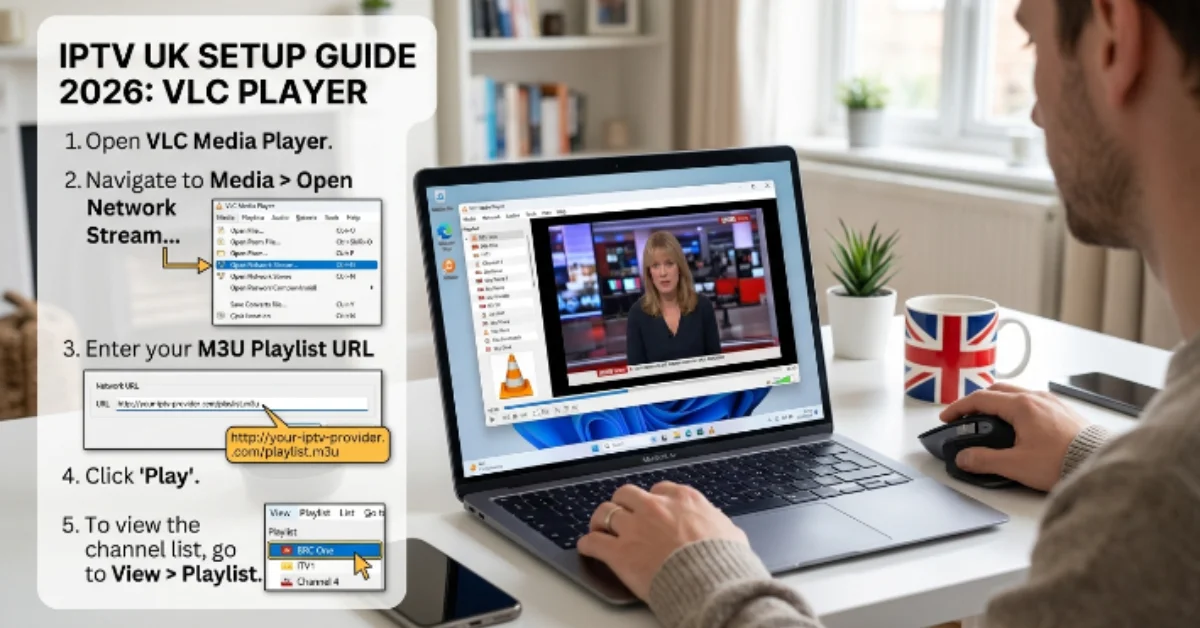
How to Add IPTV Channels to VLC Media Player (IPTV UK Beginner Guide)
If you are exploring IPTV UK solutions and want a simple, direct way to stream live TV on your computer or mobile device, VLC Media Player is one of the easiest tools to get started with. Developed by VideoLAN, VLC is completely free, open-source, and available across almost every major operating system.
This beginner-friendly guide walks you through everything step-by-step, from understanding the core mechanics of IPTV technology to adding your playlist in VLC, optimizing playback, and troubleshooting common streaming glitches.
What is IPTV and How Does It Work?
IPTV stands for Internet Protocol Television. Instead of receiving television signals through traditional satellite dishes, coaxial cable lines, or over-the-air antennas, IPTV transmits television programming directly over your standard internet connection using internet protocol suites.
When you select a stream on an IPTV service, the video data is broken down into small data packets, routed across high-speed broadband, and rendered in real time on your streaming player or computer. This method allows for on-demand flexibility, vastly expanded channel lineups, and access to ultra-high-definition video feeds.
Why Use VLC Media Player for IPTV Streaming?
While dedicated IPTV client applications like IPTV Smarters Pro or TiviMate exist, VLC Media Player remains one of the top choices for beginners and power users alike due to several distinct advantages:
Universal Compatibility: VLC runs seamlessly on Windows, macOS, Linux, Android, and iOS.
Zero Cost & No Ads: VLC is completely free with no hidden paywalls, banner advertisements, or subscription charges.
Vast Codec Library: It natively supports almost every audio and video compression format, preventing video decoding failures.
Lightweight Performance: VLC uses minimal system resources, making it ideal for older laptops and lower-spec desktop computers.
Instant Testing Tool: It serves as the ultimate diagnostic tool to quickly test whether an IPTV M3U URL or stream feed is active before configuring complex Smart TV apps.
Need Help Setting Up Your IPTV Player?
Our easy-to-follow guides walk you through the installation process so you can start streaming quickly.
Read the Setup Guide →best-iptvuk.com
Step-by-Step Guide: How to Add IPTV Channels to VLC
Setting up live TV inside VLC Media Player takes less than two minutes. Follow these detailed steps to stream your M3U playlist:
Step 1: Download and Install VLC
If you do not already have VLC installed, visit the official VideoLAN website, download the latest stable installer for your operating system, and follow the standard installation prompts.
Step 2: Obtain Your IPTV M3U Link
After signing up for a service or activating a trial, your IPTV provider will supply you with a dedicated M3U URL.
Step 3: Open Network Stream in VLC
Launch the VLC Media Player application on your computer.Ctrl + N on Windows / Cmd + N on Mac).
Need Help Activating Your IPTV App?
Follow our detailed activation guides to configure your IPTV player quickly and correctly.
Read the Activation Guide →best-iptvuk.com
Step 4: Paste Your M3U Playlist URL
In the Network tab window that opens, make sure the network protocol field is selected. Carefully copy your full M3U playlist URL from your email or provider account dashboard, paste it into the Please enter a network URL field, and double-check for any accidental spaces.
Step 5: Start Streaming Live TV
Click the Play button at the bottom of the window. VLC will take a few seconds to parse the playlist data, fetch the channel indices, and automatically begin playing the first live channel in the list.
How to Toggle and Navigate the Channel Playlist in VLC
When you first load an M3U link, VLC will only display the video feed of one active channel. To view and switch between all available channels in your package:
Click on the View menu in the top navigation bar.
Select Playlist (or press
Ctrl + Lon Windows /Cmd + Lon Mac).You will see a complete text list of every live channel, organized by category or region as defined by your provider.
Double-click on any channel name in the list to switch to that stream instantly.
Use the search bar at the top of the Playlist window to quickly locate specific sports channels, local UK networks, or PPV event feeds.
Advanced VLC Settings for Smoother IPTV Playback
If you experience periodic buffering, audio delays, or stream looping while watching IPTV on VLC, tweaking a few built-in player parameters will optimize performance:
1. Increase Network Caching
By default, VLC buffers a small amount of network data before playing a stream. Increasing this buffer prevents stuttering during brief internet speed drops:
Go to Tools > Preferences (or
Ctrl + P).At the bottom left under Show settings, select All.
Navigate to Input / Codecs in the left sidebar.
Scroll down to the Advanced section on the right and locate Network caching (ms).
Change the default value (usually 300 ms) to 1000 ms or 2000 ms for a larger safety buffer.
Click Save and restart VLC.
2. Disable Loop Playback
Sometimes, if an IPTV channel stream temporarily loses connection, VLC will automatically skip to the next channel in your playlist. To prevent this jumping behavior:
Locate the Loop / Repeat button at the bottom playback control bar near the Play/Pause controls.
Click it until the loop icon is toggled off (grayed out) so VLC stays locked on your current channel even if a temporary drop occurs.
3. Enable Hardware-Accelerated Decoding
Ensure your system’s graphics processor handles video decoding to keep CPU utilization low during 4K or 60fps streams:
Go to Tools > Preferences > Input / Codecs.
Find the Hardware-accelerated decoding setting.
Change it from Disable to Automatic (or Direct3D11 Video Acceleration on Windows).
Save your changes.
The Value of Testing via an IPTV Free Trial
If you are new to internet-based television streaming, jumping straight into a long-term subscription can be risky. Server stability, channel switching speed, and true broadcast resolution vary significantly between different IPTV UK providers.
Taking advantage of an IPTV free trial (typically lasting 24 to 48 hours) allows you to test:
Peak Hour Stability: Verify if sports channels hold up during high-demand weekend matches without freezing.
Stream Quality: Check whether advertised Full HD and 4K streams deliver true high-bitrate output.
VLC Compatibility: Ensure your provider's M3U link parses properly without returning playlist syntax errors inside VLC.
Want to Try Our Service Before Subscribing?
Experience the streaming quality and device compatibility by requesting a free trial before choosing a subscription.
Start Your Free Trial →best-iptvuk.com
Comparing IPTV with Traditional Cable Television
Upgrading to an IPTV UK setup offers several practical benefits over traditional cable or satellite installations:
Hardware Independence: Cable TV requires proprietary set-top boxes and satellite dish installations, whereas IPTV runs on your existing laptop, PC, Smart TV, or Firestick.
Global Channel Access: Cable subscriptions lock you into fixed regional broadcast bundles, while IPTV provides access to UK channels alongside international sports and news networks.
Cost Efficiency: Premium cable packages with added sports and movie tiers can easily exceed £80 to £120 per month, whereas IPTV subscriptions offer flexible monthly or annual tiers at a fraction of that cost.
Mobility: Cable TV is tied to your living room wall outlet, whereas an IPTV playlist on VLC can travel with you anywhere in the world on a laptop or smartphone.
Troubleshooting Common VLC IPTV Errors
If your streams fail to open or run into issues while using VLC, consult these quick solutions:
Error: "VLC is unable to open the M3U URL": Double-check your URL for missing characters or extra spaces. Ensure your subscription or free trial account has not expired.
Video Plays for 5 Seconds Then Stops: This occurs when VLC hits a stream break and jumps. Disable the loop/repeat toggle in VLC's bottom toolbar, or increase network caching to 2000 ms.
Audio Works But Screen Is Black: Navigate to Tools > Preferences > Video and change the Output setting from Automatic to Direct3D11 or OpenGL, then restart the player.
Frequent Buffering: Ensure your device is connected to a 5 GHz Wi-Fi band or connected via an Ethernet cable. If your local internet provider throttles streaming traffic during peak hours, turning on a secure VPN will restore standard speeds.
Looking for Helpful FAQs?
Find answers to common IPTV questions, installation tips, and streaming advice in one place.
View FAQs →best-iptvuk.com
Final Thoughts
VLC Media Player is an ideal entry point for anyone wanting to explore live TV streaming without purchasing dedicated hardware or complex software. By obtaining an M3U link from a reputable provider, opening a network stream, and configuring a few basic caching settings, you can transform your Mac, PC, or mobile device into a versatile streaming center in just a few clicks.
Free Trial Iptv Uk
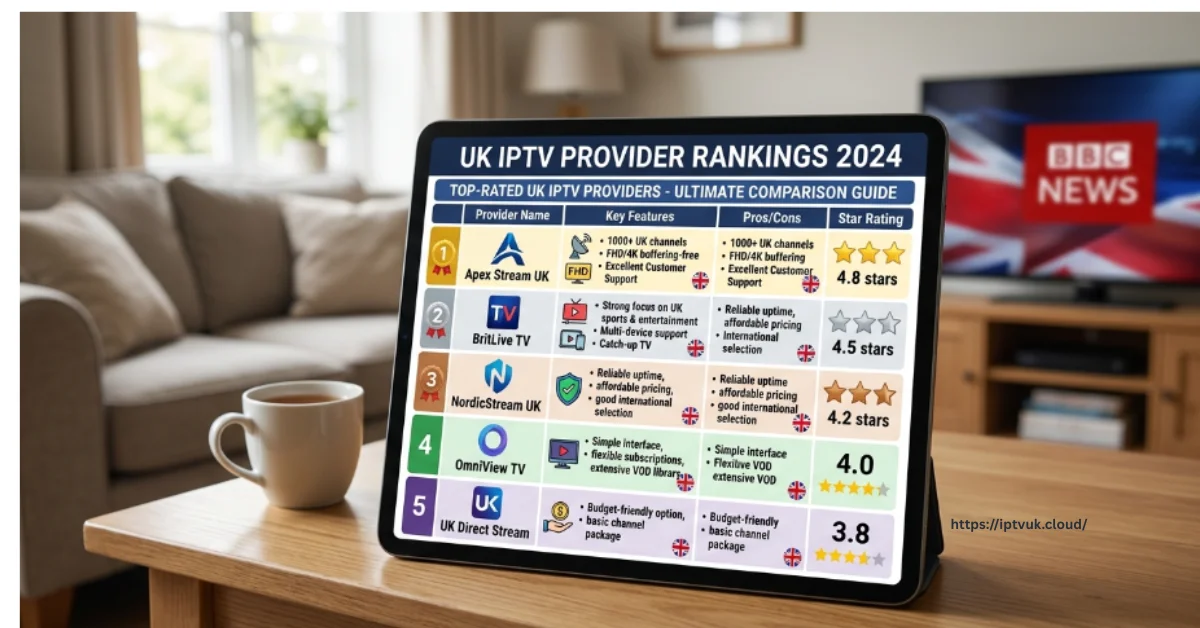
IPTV UK Providers Ranked for 2026: The Ultimate Guide to Live Streaming Services
Finding the right internet-delivered television service in 2026 is no longer just about gaining access to thousands of obscure live TV channels. Modern British viewers demand high-uptime server stability, uncompressed 4K sports feeds, responsive customer support, and seamless cross-platform performance across everything from Amazon Firesticks to living room Smart TVs.
With scores of streaming services entering the digital market, selecting a premium provider can feel overwhelming. This guide breaks down how high-performance services operate, compares subscription pricing, outlines installation steps, and examines how modern streaming measures up against traditional UK cable contracts.
Why IPTV Has Become the Standard Choice for UK Viewers
The rapid adoption of internet protocol television across England, Scotland, Wales, and Northern Ireland is driven by clear technological advantages over legacy satellite dishes and subterranean coaxial cables.
Core Advantages for UK Households:
All-in-One Content Hub: Consolidate domestic terrestrial channels, premium movie networks, global sports feeds, and updated VOD libraries within a single application interface.
Cost Efficiency: Significantly lower monthly or annual subscription costs compared to bloated, multi-tiered satellite contracts.
4K Ultra HD & 60fps Playback: Low-latency feeds deliver fluid motion clarity during high-speed Premier League, EFL, and motor racing broadcasts.
True Mobility: Stream seamlessly on smart TVs at home, or on laptops, tablets, and smartphones while traveling.
1. Essential Features of Top-Ranked IPTV Services
When evaluating a provider in 2026, raw channel counts matter far less than server architecture and streaming reliability. High-ranking providers share several key infrastructure characteristics:
Distributed Anti-Freeze CDN Servers: Multi-region server networks that dynamically distribute bandwidth load during high-traffic sports events, preventing unexpected frame drops or buffering.
Xtream Codes API Integration: Encrypted account authentication that maintains fast login speeds and continuous synchronization with Electronic Programme Guides (EPG).
Comprehensive Sports Network Coverage: Instant access to Premier League fixtures, EFL Championship games, UEFA Champions League nights, UFC, world championship boxing, and international cricket.
Hardware Acceleration Support: Native compatibility with hardware video decoders inside modern streaming sticks, ensuring smooth 60fps playback.
Looking for an IPTV Setup Guide for Firestick?
Install IPTV on your Amazon Firestick with our easy step-by-step guide. Learn how to configure your device and start streaming in just a few minutes.
Read the Firestick Guide →best-iptvuk.com
2. Test Performance with an IPTV UK Free Trial
Before purchasing a long-term plan, testing server responsiveness during peak viewing hours is highly recommended. Taking advantage of an IPTV free trial or free IPTV trial UK allows you to test real-world server performance with zero risk.
What to Check During Your Trial Window:
Peak Evening Server Stability: Stream live sports between 7:00 PM and 10:00 PM to verify feed stability during peak UK broadband usage hours.
Channel Zapping Speed: Check how fast channels switch when navigating through live categories.
EPG Accuracy: Ensure that program listings, match schedules, and channel information sync correctly with local time zones.
Video Resolution Clarity: Verify that sports feeds render true Full HD (1080p @ 60fps) or 4K Ultra HD resolution without visual artifacts.
Want to Try Our Service Before Subscribing?
Experience the streaming quality and device compatibility by requesting a free trial before choosing a subscription.
Start Your Free Trial →best-iptvuk.com
3. Step-by-Step Firestick Installation Workflow
The Amazon Firestick remains the primary hardware choice for UK streaming enthusiasts due to its affordability, portability, and native support for 4K video decoding.
4. IPTV vs. Traditional UK Cable Television
When comparing modern internet streaming services against conventional cable or satellite TV subscriptions, the differences in flexibility and overall value are clear:
Hardware Independence: Cable requires single set-top boxes wired into specific rooms, whereas internet streaming works on Firesticks, Smart TVs, mobile phones, and tablets.
Contract Flexibility: Satellite operators routinely mandate binding 18-to-24-month contracts, while streaming providers offer flexible monthly, quarterly, or annual plans.
Installation Speed: Cable setups often require technician visits and satellite dish mountings, while internet streaming can be configured in under 10 minutes.
Global Access: Internet-delivered television goes wherever your mobile internet or Wi-Fi connection goes, whereas cable is tied strictly to your home address.
5. Subscription Plan Options & Finding the Right Value
Selecting the ideal subscription length depends on your individual viewing preferences and budget:
1 Month Plan: Perfect for testing service consistency or tuning in during a specific sports tournament month.
3 Month Plan: A flexible short-term option ideal for seasonal viewing.
6 Month Plan: A balanced package offering substantial savings over monthly renewals.
12 Month Plan: The most popular option for dedicated daily viewers, delivering the lowest overall per-month cost.
Lifetime Plan: A long-term investment for users seeking permanent entertainment access without recurring monthly bills.
Need Help Choosing the Right IPTV Plan?
Compare our subscription options and find the perfect plan based on your viewing preferences, budget, and favourite content.
View Our IPTV Plans →best-iptvuk.com
For users seeking a cheap IPTV UK option, annual packages deliver the best overall savings while maintaining high server performance.
6. Commercial Opportunities with IPTV Reseller Panels
The rapid growth of the digital streaming market has created lucrative commercial opportunities for digital entrepreneurs. An IPTV reseller panel allows business owners to purchase subscription credits, generate test trials, activate user accounts, and manage a client base under their own independent brand.
Reseller dashboards feature complete administrative tools, allowing managers to monitor active connections, track sub-reseller performance, and deliver localized support in an expanding digital entertainment industry.
Frequently Asked Questions
What is the best IPTV UK service in 2026?
The best service depends on your specific viewing habits. Live sports enthusiasts should prioritize providers with anti-freeze servers and 60fps feeds, while film lovers benefit most from large VOD catalogs and fast EPG sync.
What broadband speed is needed for stable 4K IPTV streaming?
For standard HD streaming, a download speed of 15 Mbps is sufficient. For uncompressed 4K Ultra HD sports feeds, ensure your broadband connection reaches at least 35 to 50 Mbps over a wired Ethernet connection or a 5 GHz Wi-Fi band.
Is the Amazon Firestick compatible with IPTV apps?
Yes. The Firestick is one of the most widely used streaming devices in the world, running player apps like IPTV Smarters Pro, TiviMate, and XCIPTV with ease.
What is an IPTV Smarters Downloader Code?
It is a short numeric code entered into the Downloader app on Firestick or Android TV devices to fetch and install the official IPTV Smarters application file directly from secure servers.
Need Assistance with Installation or Technical Support?
Our support team is ready to help with setup, device compatibility, and any technical questions you may have.
Contact Us →best-iptvuk.com
Simple, Transparent Pricing
Choose the plan that works best for you. All plans include our 30-Day Money-Back Guarantee.
Limited Time Flash Sale!
Prices will return to normal after the timer ends.
Monthly
Perfect for trying out our service
-
28,000+ Live TV Channels
-
Full HD & 4K Quality
-
7-Day Catch Up
-
VOD Library (Movies & Series)
-
Use on 1 Device
-
24/7 Support via WhatsApp
3 Months
Great value for short term
-
28,000+ Live TV Channels
-
Full HD & 4K Quality
-
7-Day Catch Up
-
VOD Library (Movies & Series)
-
Use on 2 Devices Simultaneously
-
24/7 Support via WhatsApp
-
Save over 20% vs Monthly
Annual
Best value for loyal customers
12 Months + 2 Months FREE
-
28,000+ Live TV Channels
-
Full HD & 4K Quality
-
7-Day Catch Up & Recording
-
Premium VOD Library (Updated Daily)
-
Use on 3 Devices Simultaneously
-
VIP 24/7 Support
-
Save over 60% vs Monthly
-
Free Setup Assistance
Quarterly
Popular choice for commitment
-
28,000+ Live TV Channels
-
Full HD & 4K Quality
-
7-Day Catch Up & Recording
-
Extensive VOD Library
-
Use on 2 Devices Simultaneously
-
Priority 24/7 Support
-
Early access to new features
Secure Payment Options
We accept various secure payment methods for your convenience.
Ready for a Longer Test Drive?
Experience the full power of lightsteelblue-mallard-181895.hostingersite.com IPTV with our exclusive 24-hour free trial. Access all 28,000+ channels, VOD, and premium features with no obligation. It's the perfect way to see why we're the UK's favourite IPTV provider!
Contact Us
Have questions or need assistance? We're here to help!
Get in Touch
Email Us
contact@best-iptvuk.com
Available 24/7
Call Us
+447404860675
Available 24/7
Live Chat
Available on our website
Response time: Under 5 minutes
Our Hours
Customer Support: 24/7
Sales Department: Mon-Fri, 9am-6pm GMT
Technical Support: 24/7
